Home / First Semester
Chapter 4: Database Management Systems
Contents:
Introduction to Database Management System, DBMS Models, SQL, Database Design and Data Security, Data Warehouse, Data Mining, Database Administrator
Database
A database is a collection of logically related data that are organized in such a way, so as to facilitate easy accessing and processing of data. Database contains data, not information.
Mostly data represents recordable facts. Data aids in producing information, which is based on facts. For example, if we have data about marks obtained by all students, we can then conclude about toppers and average marks.
A database management system stores data in such a way that it becomes easier to retrieve, manipulate, and produce information.
Database Hierarchy
Anything of interest to the user about which data is to collected or stored is called an entity. An entity may be a tangible object, such as an employee, a part or a place. It may also be non-tangible such as an event, a job title, a customer account, a profit center or an abstract concept. In order to know the entity, a user has to collect data about its characteristics or attributes. Each attribute is termed as ‘data item’ or ‘data element’. Data item, the smallest unit in the database, is a combination of one or more bytes. Sometimes data item is also called a ‘field’.
Actually, Fields contain one piece of information of entry. E.g., in an address book each entry has fields for first name, last name, address, phone number etc. Each unique type of information is stored in its own field. One full set of fields i.e. all the related information about one person or object is called the record. E.g., for an address book all the information for first person is one record and the information for the second persons is called another record and so on. A collection of related records is known as a file. Similarly, in an application, there may be several related files. For example, in a salary processing system, the files may be employees file, provident fund file, income tax file etc. All these files are combined in a database. Thus, database is a set of interrelated files which can be used by several users accessing data concurrently.
Files-Orintented Approach and Database Approach
1. Files – The Traditional Approach (Traditional Approach to Information Processing)
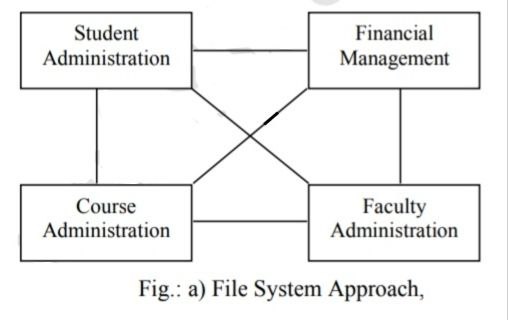
Traditionally, data files were developed and maintained separately for individual applications. Thus, the file processing system relied on the piecemeal approach of data across the organization where every functional unit like marketing, finance, production etc., used to maintain their own set of application programs and data files.
No doubt such an organization was simple to operate and had better local control but the data of the organization is dispersed throughout the functional sub-systems. So, there is little sharing of data among the various functional sub-systems or applications.
This approach was rendered inadequate, especially when organizations started developing organization-wide integrated applications.
The major drawbacks of file processing system or information processing are as follows:
- Data duplication or redundancy,
- Data inconsistency,
- Lack of data integration,
- Data dependency and
- Program dependence.
Since each application has its own data file, the same data may have to be recorded and stored in several files. For example, payroll application and personnel application both will have data on employee name, designation, etc. This results in unnecessary duplication/redundancy of common data items.
II. Data Inconsistency
Data duplication leads to data inconsistency especially when data is to be updated. Data inconsistency occurs because the same data items which appear in more than one file do not get updated simultaneously in all the data files. For example, employee’s designation, which is immediately updated in the payroll system, may not necessarily be updated in the provident fund application. This results in two different designations of an employee at the same time.
III. Lack of Data Integration
Because of independent data files, users face difficulty in getting information on any ad hoc query that requires accessing data stored in more than one file. Thus, either complicated programs have to be developed to retrieve data from each independent data file or users have to manually collect the required information form various outputs of separate applications.
IV. Data Dependence
The applications in file processing systems are data dependent, i.e. the file organization, its physical location and retrieval from the storage media are dictated by the needs of the particular application. For example, in order processing application, the file may be organized on customers records sorted on their last name, which implies that retrieval of any customer’s record has to be through his/her last name only.
V. Program Dependency
The reports produced by the file processing system are program dependent, which implies that if any change in the format or structure of data and records in the file is to be made, a corresponding change in the programs have to be made. Similarly, if any new report is to be produced, a new program will have to be developed.
2. Databases – The Modern Approach (Database Approach to Information Processing)
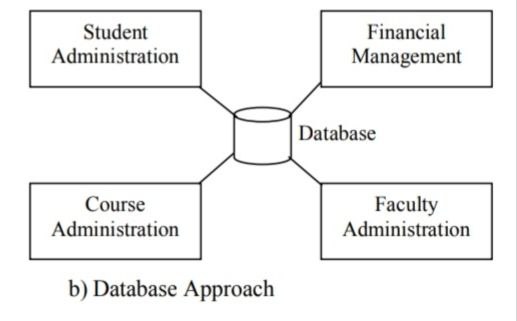
An alternative approach to the file processing system is the modern approach, known as the database approach. A database is an organized collection of records and files which are related to each other. In a database system, a common pool of data can be shared by a number of applications as it is data and program independent. Thus, unlike a file processing system, data redundancy and data inconsistency in the database system are minimized. The user is free from the detailed and complicated task of keeping up with the physical structure of the data. Ad hoc queries from the user are accepted and standard outputs (reports) may be changed or reformatted as per the information needs of users.
A clear-cut distinction between traditional file system and database system is illustrated in figure below:
Objective of a Database
- Provide for mass storage of relevant data
- Make access to the data easy for the user
- Provide prompt response to the user requests for data.
- Make the latest modifications to the database immediately
- Eliminate redundant data
- Allow multiple users to be active at one time
- Allow for growth in the database system
- Protect the data from physical harm and unauthorized access
Database Management System is software that works in conjunction with the operating system to create, store, process, retrieve, control and manage the data. The DBMS acts as an interface between the application program and the data in the database.
The purpose of a DBMS is to provide two main functions:
- A mechanism for organizing, structuring and storing data.
- A mechanism for accessing data that provides a measure of data independence, i.e., to some extent it insulates application programs from changes to the data structures.
- It Provides Storage area for huge amount of related data
- Making acess to data esay for user
- Eliminate duplicates data
- Allow multiple user to active at one time.
- Making quick responses too user request data
- Protest the data from unauthorized access
- Sharing data: Data stored in a database can be shared. It refers to the capacity that makes data simultaneously accessible by many users without any interference.
- Reduced data redundancy: The same data may be duplicated at many times or places, is called data redundancy, DBMS reduces such type of duplication of data from database.
- Data backup and recovery: DBMS provides backup facilities to store data for future use. If any files or data lost in any computer, it is possible to restore them from database server.
- Inconsistency avoided: When the same data is duplicated and changes are made at one site, and not on other sites, it causes data inconsistency. DBMS avoided such type of data inconsistency.
- Data integrity: It means data accuracy, consistency and up to date. A DBMS should provide capabilities for defining and enforcing constraints for data integrity.
- Data security: In database system, an unauthorized person cannot access data from database. Although various departments may share data in database, access to specific information that can be limited to selected users.
- Data independence: Description of data (schema) is stored in one central place. Therefore, applications do not have to recompile when the format of the data changes.
- Multiple user interfaces: DBMS provides variety of interfaces for various users. It provides query language interface, forms and command interfaces so that users interact easily wit the database.
- Process complex query: It provides different methods such as view, trigger, index etc. to process complex query.
- Expensive: Database software is very expensive for large computer systems. It also requires overhead costs for maintaining and integrity functions.
- Changing technology: It is fast changing technology.
- Needs Technical Training: It is complex to understand and implement. So, proper training is required for staff to work properly in the database system.
- Backup is needed: It needs to explicit back up. This adds costs as new storage space are needed to hold the data.
Real-world entity:
A modern DBMS is more realistic and uses real-world entities to design its architecture. It uses the behavior and attributes too. For example, a school database may use students as an entity and their age as an attribute.
Relation-based tables:
DBMS allows entities and relations among them to form tables. A user can understand the architecture of a database just by looking at the table names.
Isolation of data and application: A database system is entirely different than its data. A database is an active entity, whereas data is said to be passive, on which the database works and organizes. DBMS also stores metadata, which is data about data, to ease its own process.
Less redundancy:
DBMS follows the rules of normalization, which splits a relation when any of its attributes is having redundancy in values. Normalization is a mathematically rich and scientific process that reduces data redundancy.
Consistency:
Consistency is a state where every relation in a database remains consistent. There exist methods and techniques, which can detect attempt of leaving database in inconsistent state. A DBMS can provide greater consistency as compared to earlier forms of data storing applications like file-processing systems.
Query Language:
DBMS is equipped with query language, which makes it more efficient to retrieve and manipulate data. A user can apply as many and as different filtering options as required to retrieve a set of data. Traditionally it was not possible where file-processing system was used
ACID Properties:
DBMS follows the concepts of Atomicity, Consistency, Isolation, and Durability (normally shortened as ACID). These concepts are applied on transactions, which manipulate data in a database. ACID properties help the database stay healthy in multi-transactional environments and in case of failure.
Multiuser and Concurrent Access:
DBMS supports multi-user environment and allows them to access and manipulate data in parallel. Though there are restrictions on transactions when users attempt to handle the same data item, but users are always unaware of them.
Multiple views:
DBMS offers multiple views for different users. A user who is in the Sales department will have a different view of database than a person working in the Production department. This feature enables the users to have a concentrate view of the database according to their requirements.
Security:
Features like multiple views offer security to some extent where users are unable to access data of other users and departments. DBMS offers methods to impose constraints while entering data into the database and retrieving the same at a later stage. DBMS offers many different levels of security features, which enables multiple users to have different views with different features.
Elements of DBMS
DBMS generally composed of three elements or components which are as follows:
- Data Definition Language (DDL): The data definition language is used to create the data, describe the data and define the schema in the DBMS. It is essentially to link between the logical and physical views of the database. Logical refers to the way the user views data; physical refers to the way the data are physically stored. The logical structure of a database is sometimes called a schema. DDL serves as an interface for application programs that use the data. Once the data dictionary (It is a file that contains metadata that is data about data.) has been created, its definitions must be entered into the DBMS. For example, if a payroll program needs the employment number of an employee, the DDL defines the logical relationship between the employment number and the other data in the database and acts as an interface between the payroll program and the files that contain the employment numbers.
- 2. Data Manipulation Language (DML): A database manipulation language is a language that processes and manipulates the data in the database. It also allows the user to query the database and receive summary reports and / or customized reports. DML enables user to access, update, replace, delete and protect database records from unauthorized access.
In general, the DML is very flexible in that it may be used by itself to create, read, update, and delete records; or its commands may be called from a separate host programming language such as visual basic or java. - Database Query Language (DQL): Database query language is used for query the database and receives the filtered data for different application. It can be used for the filtering and extracting the data according to certain criteria.
The data model describes the structure of the database. A database model is the method of organizing data and represents the logical relationships among data elements in the database. A data model is an abstract model that describes how the data is represented and used. There are three types of data models.
They are:-
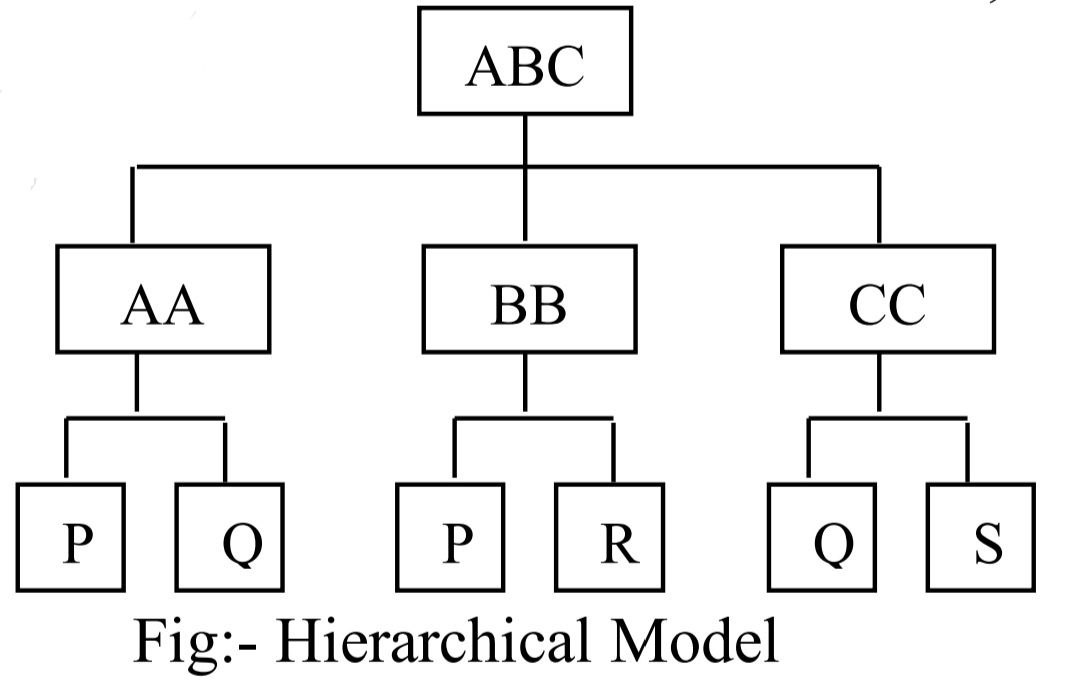
Hierarchical Model: In the hierarchical model, the relationships between records are stored in the form of a hierarchy or a tree which has a root. In this model, all records are dependent and arranged in a multi-level structure, thus the root may have a number of branches and each branch may have a number of sub-branches and so on. The lowermost record is known as the ‘child’ of the next higher level record, whereas the higher level record is called the ‘parent’ of its child records. Thus in this approach, all the relationships among records are one-to-many. A hierarchical approach is simple to understand and design but cannot represent data items that may simultaneously appear at two different levels of hierarchy, e.g., a person may be a boss and a subordinate at the same time, for different persons of course.
- It is the easiest model of database.
- A database owner is more secured because nobody else can see and modify a child without consulting to its parent.
- Searching is fast and easy, if parent is known.
- Very efficient in handling ‘one-to-many’ relationship.
- It is old fashioned, outdated database model.
- Modification and addition of child without consulting the parent is impossible or very hard. So, it is non flexible database model.
- It can’t handle ‘many-to-many’ relationship.
- It increases redundancy because same data is to be written in different places.
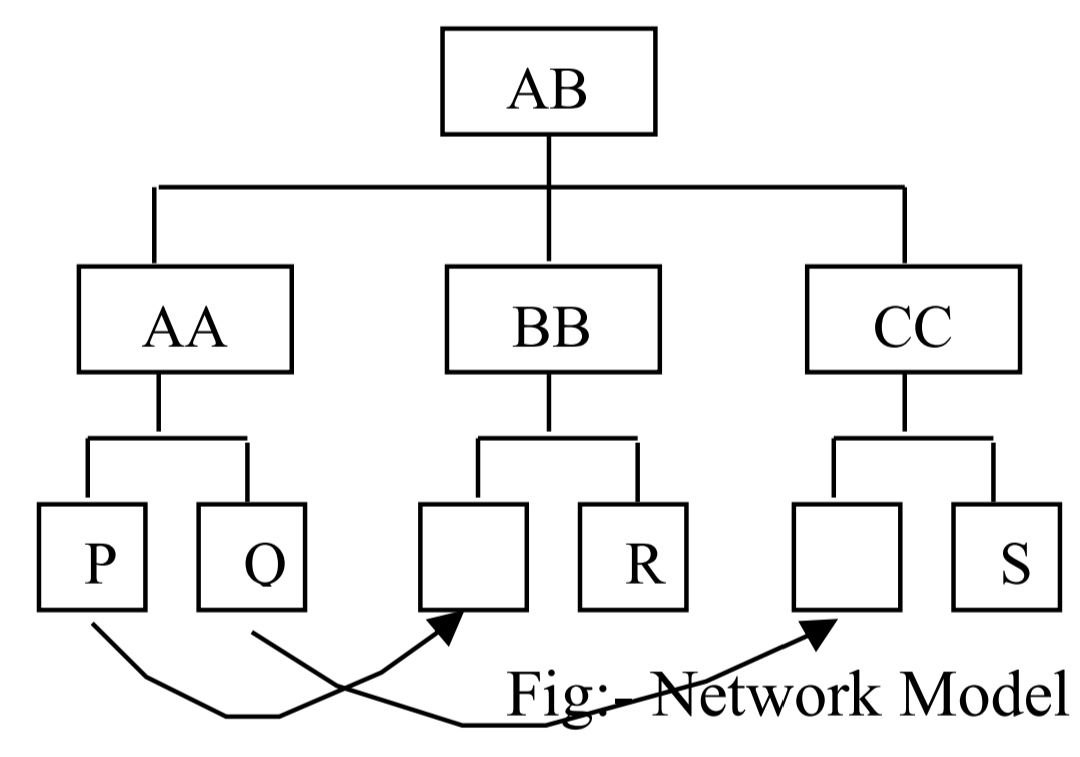
The network model allows more complex one-to-many or many-to-many logical relationships among entities. The relationships are stored in the form of linked list structure in which subordinate records, called members, can be linked to more than one owner (parent). This approach does not place any restrictions on the number of relationships. However, to design and implement, the network model is the most complicated one. It is still popular on powerful mainframes and for high-volume transaction processing applications. Since the database designer has such detailed control over data organizations, it is possible to design highly optimized database with network systems.
- More flexible than hierarchical because it accepts many-to-many relationship.
- Reduces redundancy because data shouldn’t be repeated if same type of data is needed.
- Searching is faster because of multidirectional pointers.
- Very complex type of database model.
- Needs long programs to handle the relationship.
- Pointers needed in the database model increases overhead of storage.
- Less security in comparison to hierarchical model, because it is open to all
In this model, data is represented using two-dimensional tables called relations, which are made of columns and rows. Each column represents a field, also referred to as an attributes, each row represents record, also referred to as tuple. Relational databases use three fundamental operations: select, project and join. The select operation is a horizontal cut so that only selected rows (records) are included in the query results. The project operation creates a subset of columns (or a new table) designed to meet the information needs of the user. The join operation joins or links two or more tables, if the information requested by the user is not found in one table. This model defines simple tables for each relation and many-to-many relationship. Cross reference keys link the tables together, representing the relationships between entities. Primary and secondary key indexes provide rapid access to database upon qualifications.
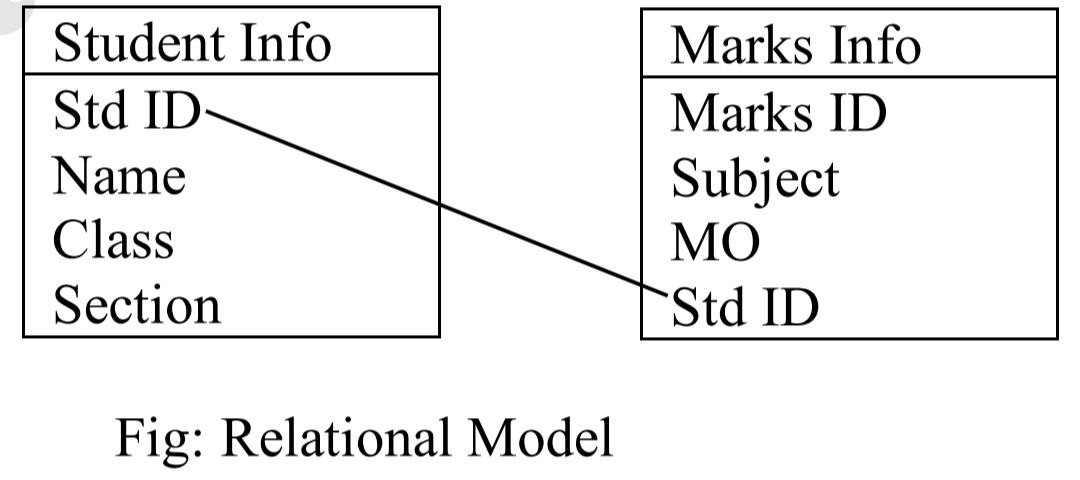
- Since one table is linked with other with some common fields, rules implemented on one table can easily be implemented on one table can easily be implemented to another.
- Some rules, popularly known as referential integrity, can easily be implemented.
- Very less redundancy.
- Normalization of database is possible.
- Rapid database processing is possible.
- It is more complex than other models.
- Too many rules make database non-user friendly.
CFA Chapterwise