Home / First Semester
Chapter 2: Computer Software
Contents:
Introduction to Software, Types of Software, Program vs Software, Computer Virus and Antivirus
A Computer needs both hardware and software for its proper functioning. Hardware components like input devices, processing unit, output devices, and storage units alone cannot perform any particular function without software. Computer software is a collection of data or programs that tells the computer how the tasks are to be performed. Without the software the computer cannot do anything i.e. computer hardware components useless without software.
Program vs Software
A program is a set of instructions which perform only a specific type of task. A program consists of a set of instructions which are coded in a programming language like C, C++, PHP, Java etc. Set of instruction for finding whether a given number is even or odd, to find factorial of a number, to find the greatest of all given numbers, to check whether a given number is palindrome or not; are few examples of the program.
The software is a broad term which is designed to perform some specific set of operations. Software consists of bundles of programs and data files. Programs in software use these data files to perform a dedicated type of tasks. Examples are: Microsoft Word, Microsoft Excel, Google Chrome, Adobe Reader, MS-Windows, Ubuntu, Linux, Unix etc.
Type of Software
- System Software
- Application Software
System software provides the basic functions that are performed by the computer. It is necessary for the functioning of a computer. Application software is used by the users to perform specific tasks. The user may choose the appropriate application software, for performing a specific task, which provides the desired functionality. The system software interacts with hardware at one end and with application software at the other end. The application software interacts with the system software and the users of the computer.
Software is defined as a computer programs together with an associated documentation that describes the programs and how they are to be used. Software is a computer programs that tells the computer what to do and how to do. Hardware cannot do be used without software. i.e. without the software the computer cannot do anything. A computer can solve the problem only if it is stated in the form of instructions which tell the computer what to do.
The Software is Divided into two major catagories and is shown below:
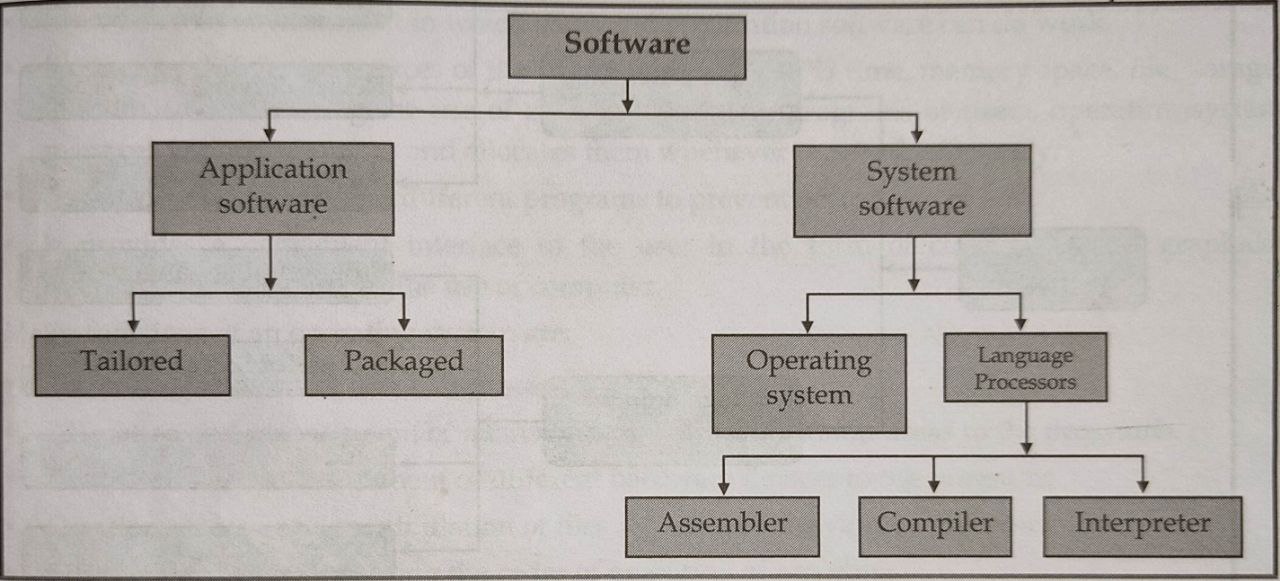
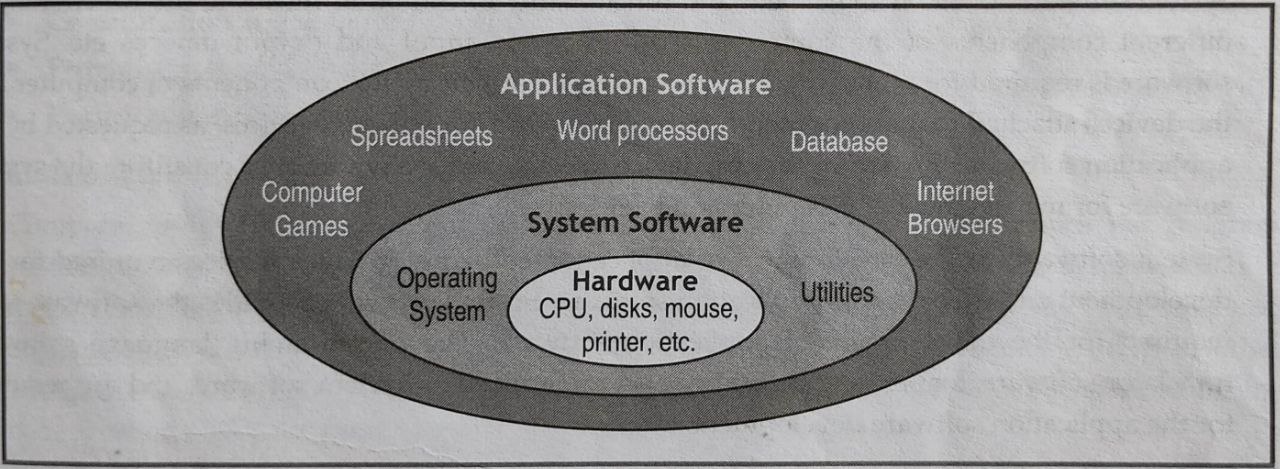
The system software is a category of software used by the system for the management and the functioning of the computer itself. It is an essential component of every computer system. It provides an environment or platform for all the other types of software to work in. The system software interacts with hardware at one end and with application software at the other end. It provides required resources and services to application software. It acts as an intermediary between computer hardware and application programs. Examples are: operating system, device drivers, compilers etc.
The main purposes of the system software are:
- To provide basic functionality to computer,
- To control computer hardware components, and
- To act as an interface between user, application software and computer hardware.
The system software can be sub-divided as follows:
- Operating System
- Translator (Language Processor)
- Utility Software
Operating system is system software that is responsible for controlling and coordinating computer hardware and providing easy interface to the application programmers and users by hiding underlying complexities of computer hardware. Thus we can say that operating system act as an interface between users and computer hardware.
The key functions of OS are:
- It provides an environment in which users and application software can do work.
- It manages different resources of the computer like the CPU time, memory space, file storage, I/O devices etc.
- It controls the execution of different programs to prevent occurrence of error.
- It provides a convenient interface to the user in the form of commands and graphical interface, which facilitates the use of computer.
Translator is a computer programs that convert the program written in other language into an equivalent machine language program before executing them. Programs written in other language is called source program and the program that is obtained after converting into machine code is called object program.
Some of the translating programs are:
- Assembler: A program which translate an assembly language program into a machine language is called an assembler.
- Compiler: A compiler is a program which translates a program at a time written in high level language into machine language program that can be understood by a computer.
- Interpreter: Interpreter is a program which translates the statement of a high-level language into machine codes. It translates one statement at a time.
Utility programs refer to small programs, which provide additional capabilities to the computer system in addition to the ones provided by the operating system. They enable an operating system to perform some additional tasks, such as searching and printing the files and scanning the viruses, etc. Some examples of utility programs include: Virus scanning software, Backup software, Scandisk, Disk Defragmenter software etc.
2. Application Software:
The software that is used to solve a specific user-oriented problem using the computer is known as application software. Application software may be a single program or a set of programs. A set of programs that are written for a specific purpose and provide the required functionality is called software package. Application software is written for different kinds of applications – graphics, word processors, media players, database applications, telecommunication, accounting purposes etc. Some examples are: MS Word, MS-Excel, CAD/CAM, Oracle etc.
Types of Application Software:
i) Customized or Tailored Software:
Customized or tailored software is the software designed to meet the specific requirements of an organization or individuals. It is developed on the demand of customer by a software contractor. It serves only one user or organization. This type of software made for one organization cannot be in another organization. Examples are : banking software, hospital software, hotel reservation software, billing software etc.
ii) Packaged Software:
Packaged software is that software which is generalized set of programs designed and developed for general purpose. These are the software which are produced by development organization and sold on the open market to any customer who is able to buy them. It is also called universal software as it can be used by users and organizations all over the world. Examples are : word processing package, spreadsheet package, database package etc.
Different Between System Software and Application Software
| System Software | Application Software |
|---|---|
| 1. System software is a group of programs that direct the internal operations of computer system such as controlling I/O devices, managing the storage area within the computer etc. | 2. The software that is written by the user to solve a specific user oriented problem using the computer is known as application software. |
| 2. Generally users do not interact with system software. | 2. Generally users interact with application software. |
| 3. System software runs independently. | 3. Application can't run without the present of the system software. |
| 4. System software perform several task. | 4. Application software perform specific task. |
| 5. It is of three types: Operating system, Language processor and Utility software | 5. It is of two types: Tailored software and Packaged software |
| 6. Example: Windows XP, Linux. | 6. Example: Adobe, Herosoft, Microsoft. |
Different Between Program and Software
The terms software and program are used interchangeably as they often refer to the same thing in daily usage. Still, there are some differences between them. Software is a very broad term that is used to identify programs, data, and other related files that are used to accomplish certain tasks in a computer or any other device that performs a computing task. In this sense, we can say that even a program is also software. But in the broader meaning of the word, a program is any set of instructions that are executed by a machine.
As an example, software records names and addresses in a database. The program and the database are parts of the software but the database is not a program. It is simply an accessory to the program that makes it more useful.
Software, including programs, is usually stored in storage media like flash memory or hard drives. This makes it easy for the hardware to retrieve the information quickly and automatically. But programs already existed prior to the coining of the word software.
| Program | Software |
|---|---|
| 1. The set instructions that instructs the computer to perform the specific task and written using the programming language of concern is called program. | 2. The set of computer programs together with an associated documentation is software. It tells the computer what to do and how to do. |
| 2. A program is independent of its own. | 2. For developing software collection of program is needed. |
| 3. It is created by a single programmer. | 3. It is developed by a group of programmer as a team |
| 4. Normally program does not license to use. | 4. Generally, the license is required for commercial software. |
| 5. Small in size and demands less memory during execution. | 5. Large in size and demands more resources during execution |
| 6. Cannot be categorized according to needs and use. | 6. Categorized as system, application software. |
| 7. Example: C program to find factorial of a number. | 7. Example: Word, Windows etc. |
A computer virus is a malicious software program loaded onto a user’s computer without the user’s knowledge and performs malicious actions. It is a program, script or macro designed to cause damage, steal personal information, modify data, make a copy of file, display messages or some combination of these actions. The purpose of creating a computer virus is to infect vulnerable systems, gain admin control and steal user sensitive data.
Symptoms of Virus
- Computer slows down without any reason.
- Computer system has less available memory than it should.
- Unknown programs or files are being created.
- Unknown programs that start up when turn on the computer.
- Programs or files become missing.
- Mass emails being sent from our email account.
- Corrupted files.
- Computer restarts in unusual ways.
- Some files or programs suddenly don't work properly.
- Strange messages, displays, music or sounds.
- Changed Hard Drive name or Volume name
- Hard Drives or Disk Drives are inaccessible.
- Unusual activities like password changes.
i) Boot Sector Virus: This type of virus infects the master boot record and it is challenging and a complex task to remove this virus and often requires the system to be formatted. Mostly it spreads though removable media.
ii) Direct Action Virus: This is also called non-resident virus; it gets installed or stays hidden in the computer memory. It stays attached to the specific type of files that it infects. It does not affect the user experience and system’s performance.
iii) Resident Virus: Unlike direct action viruses, resident viruses get installed on the computer. It implants itself in the memory of a computer.
iv) Multipartite Virus: This type of virus spreads through multiple ways. It infects both the boot sector and executable files at the same time.
v) Polymorphic Virus: These types of viruses are difficult to identify with a traditional anti-virus program. This is because the polymorphic viruses alter its signature pattern whenever it replicates.
vi) Overwrite Virus: This type of virus deletes all the files that it infects. The only possible mechanism to remove is to delete the infected files and the end-user has to lose all the contents in it.
vii) Space filler Virus: This is also called “Cavity Virus”. This is called so as they fill up the empty spaces between the code and hence does not cause any damage to the file.
viii) Macro Viruses: The macro viruses particularly target macro language commands in application like Microsoft Word. The macro viruses are designed to add their malicious code to the genuine macro sequences in a Word file.
ix) Rootkit Viruses: The rootkit virus is a malware type which secretly installs an illegal rootkit on an infected system. This opens the door for attackers and gives them full control of the system.
x) System or Boot-record infectors: The boot-record infectors infect executable code found in specific system areas on a disk. As the name implies, they attach to the USB thumb drives and DOS boot sector on diskettes or the Master Boot Record on hard disks.
How do Viruses Spread?
1. Email attachments: Computer viruses can’t infect your computer through a text-only email. However, if an email includes an attachment or clickable link, those could be vehicles for a virus. If you open an attachment or click a link, your computer downloads that information. If that attachment or link includes a virus, your computer is now infected.
2. Removable Media: When you attach a memory card, USB flash drive, external hard drive or any other kind of removable media to your system, you face the potential of importing a virus. If a hacker attached a virus to a program or file on the drive, you’ll also install the virus when you plug in the media.
3. File Sharing: Many viruses will spread themselves through open network shares. This is the huge problem on network.
4. Downloading files or software: When we download anything off of the internet, we’re installing new files and code on the computer. Many viruses are attached to freebie downloads, including free software trials or, ironically, free virus protection.
5. Web pages: Certain viruses have been known to infect web servers. If we visit a website that is hosted on an infected server, our computer could become infected with the virus.
Antivirus
Anti-virus software is a software utility that detects, prevents, and removes viruses, worms and other malware from a computer. When a virus is detected, the computer displays a warning asking what action should be done, often giving the options to remove, ignore, or move the file to the vault. Most anti-virus programs include an auto-update feature that permits the program to download profiles of new viruses, enabling the system to check for new threats. There are many Antiviruses like Norton PC, McAfee, AVG etc.
Functions of Antivirus:
- Scans specific files or directories for any malware or known malicious patterns.
- Allows to schedule scans to automatically.
- Allows to schedule scans to automatically.
- Allows initiating a scan of a particular file or the entire computer, or CD or flash drives at any time.
- Removes any malicious code detected.
- Shows the health of the computer.
Antivirus software is distributed in a number of forms, including stand-alone antivirus scanners and internet security suites that offer antivirus protection, along with firewalls, privacy controls and other security protections. Some antivirus software vendors offer basic versions of their products at no charge. These free versions generally offer basic antivirus and spyware protection but more advanced features and protections are usually available only to paying customers While some operating systems are targeted more frequently by virus developers, antivira software is available for most OSes:
1. Windows Antivirus Software
Most antivirus software vendors offer several levels of Windows products at different price points, starting with free versions offering only basic protection. Users must start scans and updates manually and typically free versions of antivirus software won't protect against links to malicious websites or malicious attachments in emails. Premium versions of antivirus software often include suites of endpoint security tools that may provide secure online storage, ad blockers and file encryption. Since 2004, Microsoft has been offering some kind of free antivirus software as part of the Windows operating system itself, generally under the name Windows Defender though the software was mostly limited to detecting spyware prior to 2006.
2. macOS antivirus software
Although macOS viruses exist, they're less common than Windows viruses, so antivirus products for macOS are less standardized than those for Windows. There are a number of free and pald products available, providing on-demand tools to protect against potential malware threat through full-system malware scans and the ability to sift through specific email threads attachments and various web activities.
3. Android Antivirus Software
Android is the world's most popular mobile operating system and is installed on more mobile devices than any other OS. Because most mobile malware targets Android, experts recommend all Android device users install antivirus software on their devices. Vendors offer a variety of basic free and paid premium versions of their Android antivirus software including anti-theft and remote-locating features. Some run automatic scans and actively try to stop malicious web pages and files from being opened or downloaded.
(Click Here to Download This Note)
CFA Chapterwise